
DbAppWeb.com

Menu
  • Home
  • Linux
  • HP-UX
  • macOS
  • Windows
  • Web Servers
  • App Servers
  • Storage

How To Enable Delete Confirmation Dialog In Windows 10

August 16, 2019 DbAppWeb Admin

Problem

If you are using Windows 10 then you must have noticed that when you are deleting a file/folder then your Windows doesn’t show a delete confirmation dialog. This is the default setting in Windows 10 for deletion of a file/folder i.e. when you select a file/folder and press the delete button to delete it then Windows doesn’t prompt any confirmation dialog.

Solution

You may change this default setting, follow the steps given below:

  • Right-click on the Recycle Bin and click on the Properties

    How To Enable Delete Confirmation Dialog In Windows 10 1

    01. How To Enable Delete Confirmation Dialog In Windows 10

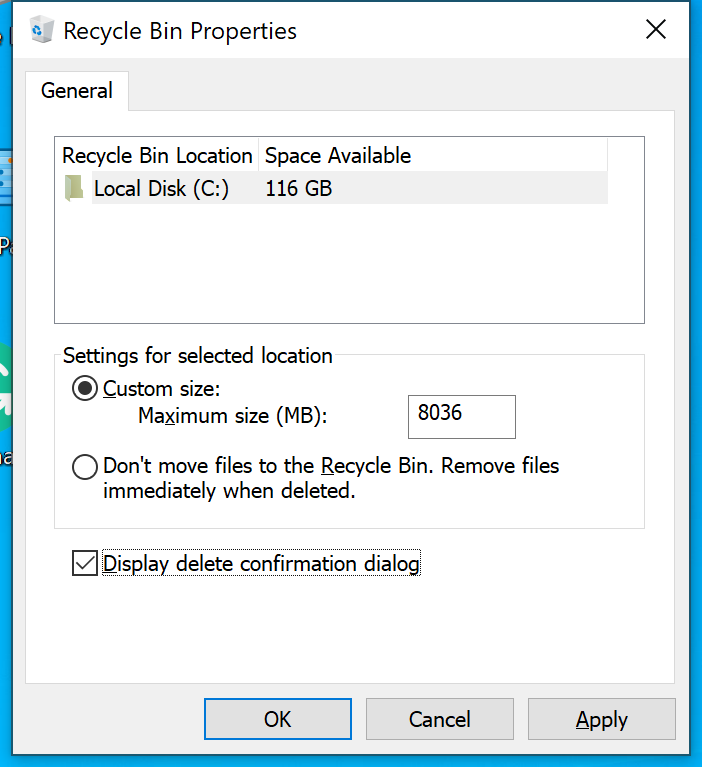
  • Select the Disk in my case there is only one disk Local Disc (C:). You can see that checkbox against the Display delete confirmation dialog is not checked.

    How To Enable Delete Confirmation Dialog In Windows 10 2
    02. How To Enable Delete Confirmation Dialog In Windows 10
  • Check the check-box against the Display delete confirmation dialog and click on the OK button.

    How To Enable Delete Confirmation Dialog In Windows 10 3

    03. How To Enable Delete Confirmation Dialog In Windows 10

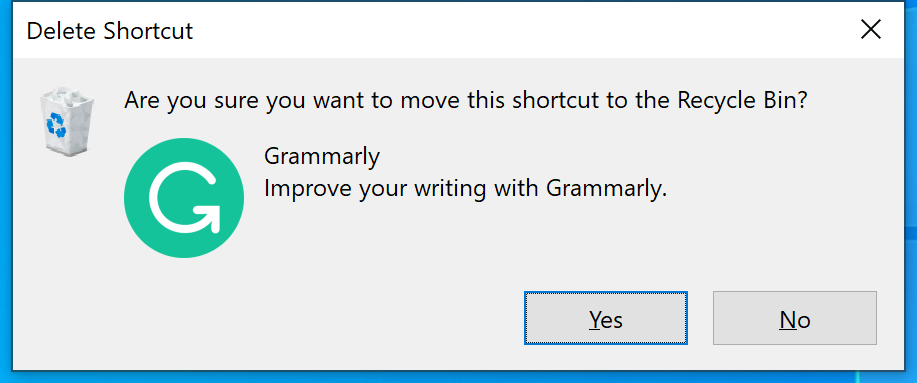
  • Now, try to delete any file/folder, it will display the delete confirmation dialog as shown below.

    How To Enable Delete Confirmation Dialog In Windows 10 4

    04. How To Enable Delete Confirmation Dialog In Windows 10

Last Updated: August 16, 2019

Share this:

  • Share on Facebook (Opens in new window) Facebook
  • Share on WhatsApp (Opens in new window) WhatsApp
  • Share on LinkedIn (Opens in new window) LinkedIn
  • Share on Telegram (Opens in new window) Telegram
  • Email a link to a friend (Opens in new window) Email
Prev Article
Next Article
Tags:Delete Confirmation Dialog Sys Admin Window 10 Windows

Leave a Reply Cancel Reply

This site uses Akismet to reduce spam. Learn how your comment data is processed.

  • Popular
  • Recent

Categories

  • Android (2)
  • Blogger (16)
  • Domain and Hosting (1)
  • Hardware Issues (7)
  • HP-UX (55)
  • HPE Data Protector (9)
  • IBM Lotus Notes (2)
  • IBM WebSphere Application Server (16)
  • Internet Tips & Tricks (15)
  • iOS (8)
  • JBoss/WildFly Application Server (2)
  • Linux (76)
  • macOS (15)
  • Microsoft Windows (31)
  • News and Updates (11)
  • Oracle Database (5)
  • SSL/TLS (1)
  • Storage Servers (23)
  • Tools/Softwares (1)
  • VMware ESXi (17)
  • Web Servers (14)
  • WordPress (5)

Archives

DbAppWeb.com

Solution of Database, Application and Web Server Problems

About DbAppWeb.com

One Stop Solution for Database Server, Application Server and Web Server Problems.

Subscribe to Blog via Email

Enter your email address to subscribe to this blog and receive notifications of new posts by email.

DbAppWeb on Social Media

Copyright © 2026 DbAppWeb.com
Terms and Conditions   Theme by MyThemeShop.com

Loading Comments...